ArtCraft free Office alternatives are worth exploring with disposable copies, not your only working files. Try WordCraft for documents, GridCraft for spreadsheets and DeckCraft for presentations, then reopen each exported file in the application your recipient uses. Keep your existing workflow until that round trip preserves the content, calculations and review history you need. A file opening successfully is only the beginning of the check.
If another software renewal is approaching, wanting a less expensive option is reasonable. You do not need to become a developer, or move every document at once, to investigate. You need a small test folder, a few fictional examples and a clear stopping rule. This guide is a documentation-based trial plan, not a hands-on compatibility review or a security certification. It does not report that we installed these applications or tested their exports. Start with the file type you actually use most; leave anything confidential or deadline-critical out of the experiment.
What ArtCraft free Office alternatives currently offer
The developers describe three independent, free, open-source applications: WordCraft reads and writes DOCX; GridCraft uses XLSX as its native spreadsheet format; and DeckCraft opens and saves PPTX presentations. Their repositories list MIT-or-Apache-2.0 licensing. Those are developer descriptions, not independent evidence that every Microsoft Office feature survives a handoff.
Freshness matters here. Checked on 17 October 2026, the repositories’ latest-release endpoints identified v0.7.0 for all three applications, published on 14 October. WordCraft’s v0.7.0 release notes include changes to layout, printing and tracked deletions. The live repository documentation still describes these tools as alpha-stage software. Check your chosen release again before downloading; a development-branch feature list may not match the packaged build.
Do not turn a feature-count percentage into a reliability score. A command existing does not tell you whether your complicated invoice, workbook or presentation will survive saving. This article deliberately makes no universal replacement, performance or savings claim.
1. Prepare a protected trial folder, not a migration
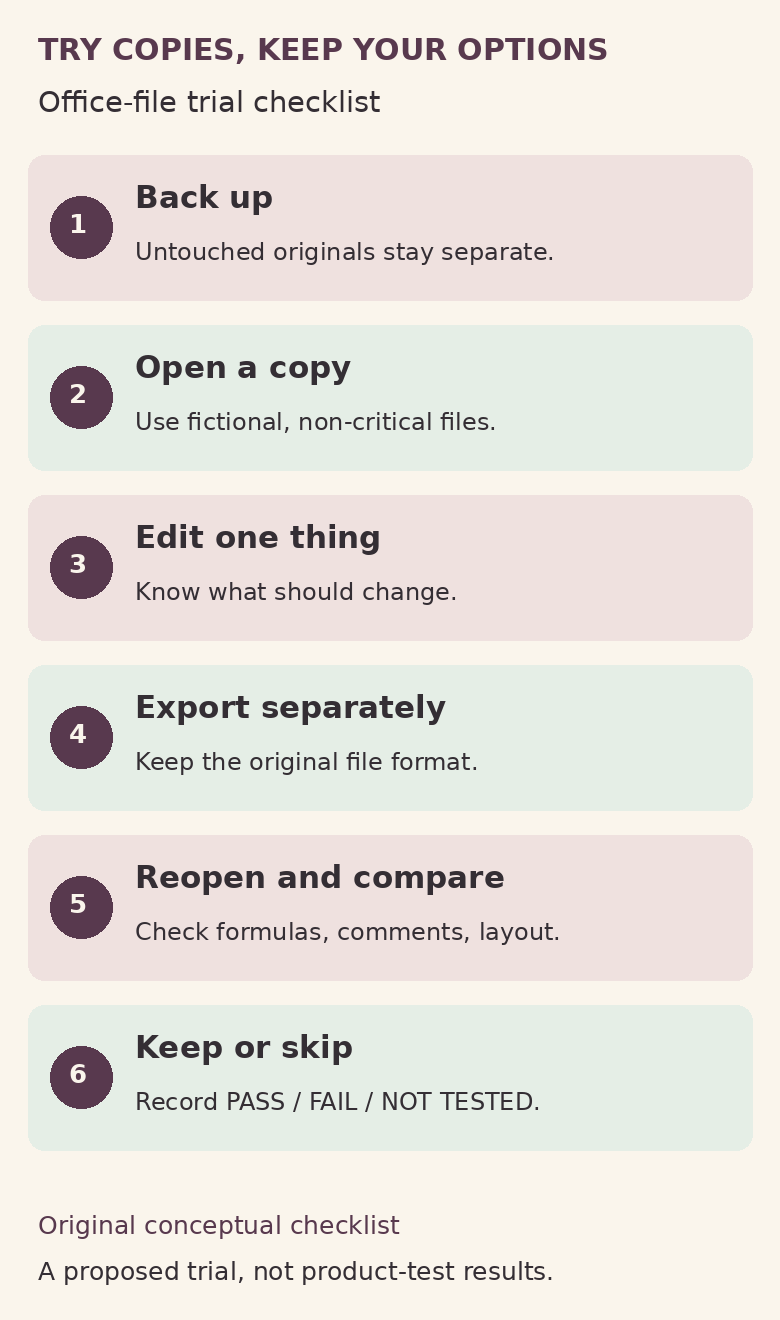
Make a folder called Office-alternative-trial. Keep untouched originals somewhere else, with a separate backup you know how to retrieve. Put only disposable copies or newly created fictional files in the trial folder. Use different names for each stage: brief-original.docx, brief-trial-export.docx and brief-return-check.docx. Do not make the experimental app the default for all your documents during this first session.
For work or school equipment, check the organisation’s installation and data-handling rules first. An open-source licence is not permission to upload employer information or install software on a managed laptop. Start from the repositories linked above and follow their own release links, choosing the build for your operating system and processor. If a security warning appears, stop and investigate through the project’s documentation or your IT team; this checklist does not advise disabling protections.
Keep AI agents, external connectors and automation out of the first trial. The projects document agent-control capabilities, but you do not need to grant an agent access to your folders to judge a document editor. A native application, a browser build and a third-party hosted service are different environments. Do not assume that an offline claim for one setup proves confidentiality for all of them.
2. Give WordCraft a document with review history
Create a fictional two-page project brief in your usual word processor. Include a title, two heading levels, a numbered list, a small table, a picture, a header, a page number, one comment and a tracked insertion and deletion. Use invented names and text, not a real client contract or a redacted file whose hidden information you have not inspected. Save a baseline PDF and note the expected page count.
Open the DOCX copy in WordCraft. Check whether the headings, list numbers, table boundaries and picture placement remain understandable. Make one small edit, add a comment and, if available in that build, create a tracked change. Save under a new filename, close the application and reopen that export in the original word processor.
Now inspect the review tools, not just the page. Can you still see who changed what? Can you accept and reject the intended edits without losing nearby text? Does the comment stay attached to the right passage? WordCraft’s documentation lists comments, track changes and DOCX exchange, but your round-trip observation is what matters for your file.
Compare the PDF layout separately. A readable PDF does not prove the editable DOCX retains its review history; conversely, a preserved comment does not prove pagination matches. If your recipient requires an editable document, a PDF is not an equivalent substitute. Keep that distinction in your trial notes.
3. Give GridCraft a synthetic budget with known answers
Make a fictional budget with columns for Item, Planned, Actual and Difference. Use three imaginary rows: stationery, 40 planned and 35 actual; travel, 100 and 120; training, 60 and 50. Define Difference as Actual minus Planned. The expected differences are -5, 20 and -10; totals are 200 planned, 205 actual and 5 over plan. These are deliberately invented practice amounts, not a household dataset or claimed product result.
In your normal spreadsheet app, enter formulas for the differences and totals. Add a date, a percentage, one comment and a simple chart if those reflect your work. Save the XLSX baseline. Open a copy in GridCraft, inspect the formula bar as well as the displayed numbers, then change travel’s Actual from 120 to 110. Expected Actual total becomes 195 and the overall Difference becomes -5.
Save a new XLSX, close it and reopen it in the original app. Check formulas, cell references, number formats, dates, the comment and the chart. Change another input to see whether dependent results update. A stored number that looks right is not enough if the formula disappeared. GridCraft’s README describes XLSX round-trip support but also acknowledges rough file fidelity.
This simple exercise does not validate payroll, tax calculations, macros, linked workbooks, specialised functions or your organisation’s financial models. Do not extrapolate a pass on three rows into permission to use it for consequential calculations. For a separate everyday organisation project, our no-code household admin tracker explains a different, low-stakes spreadsheet workflow.
4. Give DeckCraft a presentation you can inspect
Create a fictional three-slide PPTX: a title slide, a slide with bullets and an image, and a slide with a small table or chart. Add speaker notes and one transition if you use them. Save a baseline PDF. Avoid a real sales pitch or presentation due tomorrow; the point is to make problems cheap to discover.
Open a copy in DeckCraft. Check text wrapping, missing fonts, image cropping, object positions and notes. Edit a heading, save to a new PPTX, then reopen it in PowerPoint or the actual recipient application. Run the slideshow, not just the editor preview. Look for clipped labels, changed object order and a missing final line of text.
DeckCraft documents PPTX exchange, notes and presentation features. Treat those as things to investigate, not a guarantee about every embedded object, media file or animation. If a feature your work depends on cannot be checked, mark it not tested, rather than assuming support. A static PDF comparison can help with slide appearance but cannot establish that animations, audio or presenter notes behave correctly.
5. Compare established options against the same need
You do not have to choose between an experimental application and a paid desktop subscription. Compare a few relevant options using the same disposable files. Do not move private files into a cloud service simply because a comparison article mentions it.
- A desktop office suite: LibreOffice’s official site describes its free, open-source suite, including Writer, Calc and Impress. It is an established option to evaluate for local document work, not a promise of perfect compatibility. Repeat the same export-and-reopen checks.
- Microsoft’s browser apps: Microsoft documents free web versions of Word, Excel and PowerPoint with a Microsoft account. Free browser access is not a free licence to the full desktop applications. Compare the exact features and storage arrangements you need rather than treating every edition as interchangeable.
- Google’s document workflow: Google distinguishes editing Office files in their original format from conversion to Docs, Sheets or Slides. Conversion creates a copy; some Google-specific features require it. Record which route you used, and test the downloaded Office file rather than only checking the Google view. Confirm account terms and organisational permission separately.
The right question is, “Which option handles my actual handoff with the least avoidable friction?” It is not “Which logo has the longest feature list?” If cost is the motivation, begin with our software subscription audit checklist. Keep this trial separate from renewal decisions until your document workflow and other subscription benefits are understood.
6. Record a keep-or-skip decision you can revisit
Use one line per file: application and version; operating system; original format; feature checked; observed result; exported filename; recipient app; pass, fail or not tested. Include the date. A useful note says “comment missing after reopen,” not “seems fine.” If you find a problem, keep a synthetic reproduction for a bug report; do not post a confidential original or an unreviewed log publicly.
Keep exploring if the small files survive and you can explain the limitations. Limit use to non-critical drafts if basic editing works but collaboration or formatting does not. Skip for now if necessary information disappears, calculations differ, or the app cannot reliably open and save your trial. None of these outcomes is a personal failure. A tool can be interesting without being the tool your working week needs.
For wider context on evaluating software deals, our older software-deals guide is a spending-discipline bridge, not a current offer list. This checklist adds the missing compatibility question: can you keep using and sharing your files without creating more work?
Two questions before you start
Does “free and open source” mean safe for confidential files?
No. A licence describes permissions, not a security audit or your employer’s approval. This guide has not independently audited the applications. Use synthetic files, check the exact download and environment, and follow your organisation’s rules before considering private information.
Can I stop paying for Office after one successful trial?
One successful trial does not establish full replacement. Check the other documents, collaboration requirements and subscription benefits you depend on. Keep billing decisions separate from this compatibility exercise; no cancellation or savings outcome is established here.
Your next step: create one disposable file, write down its expected result and complete one open-edit-save-reopen cycle. Leave the originals untouched. You will have a small piece of evidence about your workflow—not another software promise to take on trust.